Webhooks, debugged by AI.
AI-powered webhook tunnels — inspect, explain and replay every request in real time. Also works for an MCP server or any other HTTP service on your machine.
$ curl -fsSL pipehero.app/install | shWorks with Stripe, GitHub, Shopify webhooks — or a Streamable HTTP MCP server
$ pipehero start myapp --port 3000

  tunnel up   https://myapp.t.pipehero.app  →  localhost:3000
  inspect     http://127.0.0.1:4140

  POST /webhooks/stripe  200  24ms
  POST /webhooks/github  200  18ms
  GET  /health  200  3ms
  POST /webhooks/stripe  500  61ms
Built an MCP server? Get it in front of a cloud client in one command.
A Streamable HTTP MCP server on localhost is invisible to Claude.ai and ChatGPT — they only run in the cloud, with no way to reach your machine. The same tunnel that already works for webhooks gives it a public HTTPS URL.
pipehero start myserver --port 3000 --long-requests
SSE doesn't stream through the tunnel yet, and requests default to a 30-second timeout — --long-requests opts the tunnel into 120 seconds instead, for tool calls that legitimately run long. Set once, remembered for every future run.
Webhook tunnels your AI agent can actually use
Pipehero ships an MCP server, so your AI agent can list your tunnels, read captured webhooks, and replay them to localhost — no context-switching. Different from the tunnel above: this is Pipehero's own MCP, for debugging your webhook traffic — not exposing a server you built. MCP is an open standard, so it works with whatever you use:
claude mcp add --transport http pipehero https://mcp.pipehero.app/mcp
›“The last webhook to myapp returned 500 — read the payload and my handler and tell me why.”
›“Fix it, then replay the webhook to confirm it works.”
Your API, documented with real examples and kept current by your AI
Save endpoints with the requests and responses you actually see, run them on localhost, staging and production, and share them with your team, or with a partner through a read-only link.
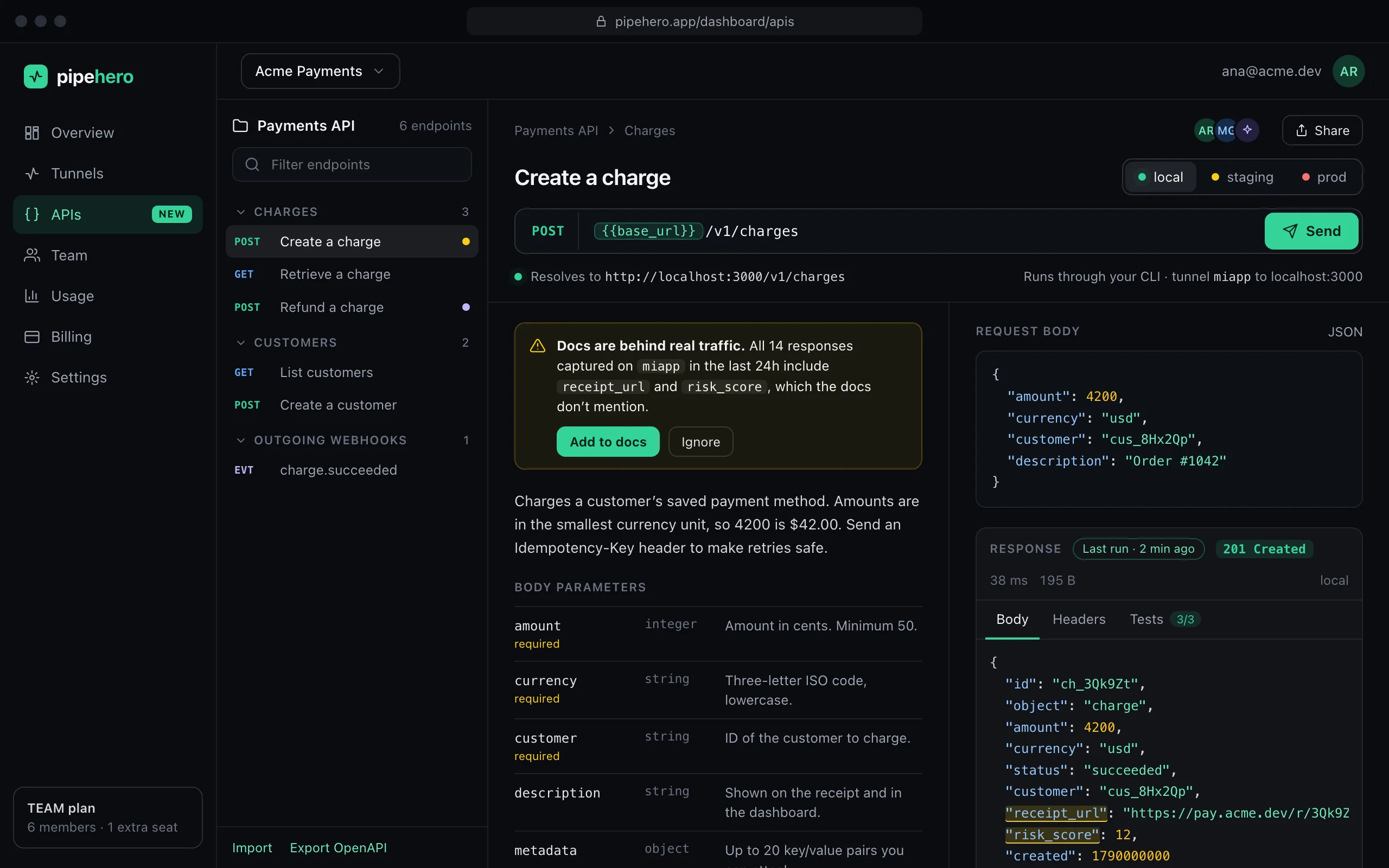
Everything you need to tunnel & debug
Not just a tunnel — a full inspection and replay workflow built for the way developers actually work.
Public tunnels
A stable URL per project. Point Stripe, GitHub or any provider at it and receive real webhooks on your machine.
Live inspection
Every request as it lands — method, path, headers, body, status and latency — in a built-in local panel.
Replay & edit
Re-fire any request to localhost without waiting for the provider. Tweak the body first to test edge cases.
Live metrics
Connections, request rate and p50/p90 latency — ngrok-style — in your terminal and the web panel.
Built for teams
Share tunnels and request history across your org, with roles and reserved subdomains. Debug together, not over screenshots.
Signature checks
Verify Stripe / GitHub / Shopify signatures at the edge — every request gets a ✓/✗ badge, checked over the raw body before it hits your code.
MCP server tunnel
NEWExpose a local Streamable HTTP MCP server to Claude.ai, ChatGPT or any cloud-only client — the same tunnel, pointed the other way.
Realtime WebSocket tunnel
NEWTunnel your own app's WebSocket connection to localhost — test a real iOS/Android build against your machine over HTTPS, from anywhere. Pro/Team.
From zero to running in seconds
Install
curl -fsSL pipehero.app/install | shLog in
pipehero loginStart a tunnel
pipehero start myapp --port 3000Point your webhook
Add the public URL to your provider's webhook settings — Stripe, GitHub, Shopify or any HTTP source.
Expose your own MCP server
A Streamable HTTP MCP server on localhost is invisible to Claude.ai and ChatGPT. Same tunnel, pointed the other way.
Test your app on a real device
Same tunnel, WebSockets included — point your iOS/Android build at a real HTTPS URL and reach your machine's localhost. Pro/Team.
Simple pricing
Start free. Upgrade when you need more.
- ✓1 tunnel
- ✓5 req/s per tunnel
- ✓Live tail + local inspection
- ✓Replay to localhost
- ✓Offline capture (last ~50)
- ✓Basic signature verification
- ✓3-day request history
- ✓MCP access
- ✓MCP server tunnel
- ✓API workspace: 1 collection, 25 endpoints, share by link or emailNEW
- ✓Email + chat support
Everything in Free, plus:
- ✓3 tunnels
- ✓20 req/s per tunnel
- ✓30-day request history
- ✓Full offline capture
- ✓Advanced signature verification + alerts
- ✓AI fake-webhook generator
- ✓Failure alerts (email)
- ✓Realtime WebSocket tunnelNEW
- ✓API workspace: 10 collections, 500 endpoints, cloud runs, drift and 5 monitorsNEW
Everything in Pro, plus:
- ✓Up to 5 members, then $5/seat/mo
- ✓Unlimited tunnels
- ✓API workspace: unlimited, 50 monitors, AI review and commentsNEW
- ✓100 req/s per tunnel
- ✓Shared workspace, roles & invites
- ✓90-day request history
- ✓Priority support
Plans are per workspace — each workspace is billed separately.
Stop guessing what your webhooks send.
Tunnel, inspect, replay. Get back to building.
Open the dashboard