Let your AI agent keep the API docs true
You add a route, change a field, delete an endpoint. The docs are the last thing anyone updates. With the Pipehero MCP server your agent does it while it writes the code, and you keep control of what lands.
The MCP tools are on every plan. Review of AI changes is on Team.
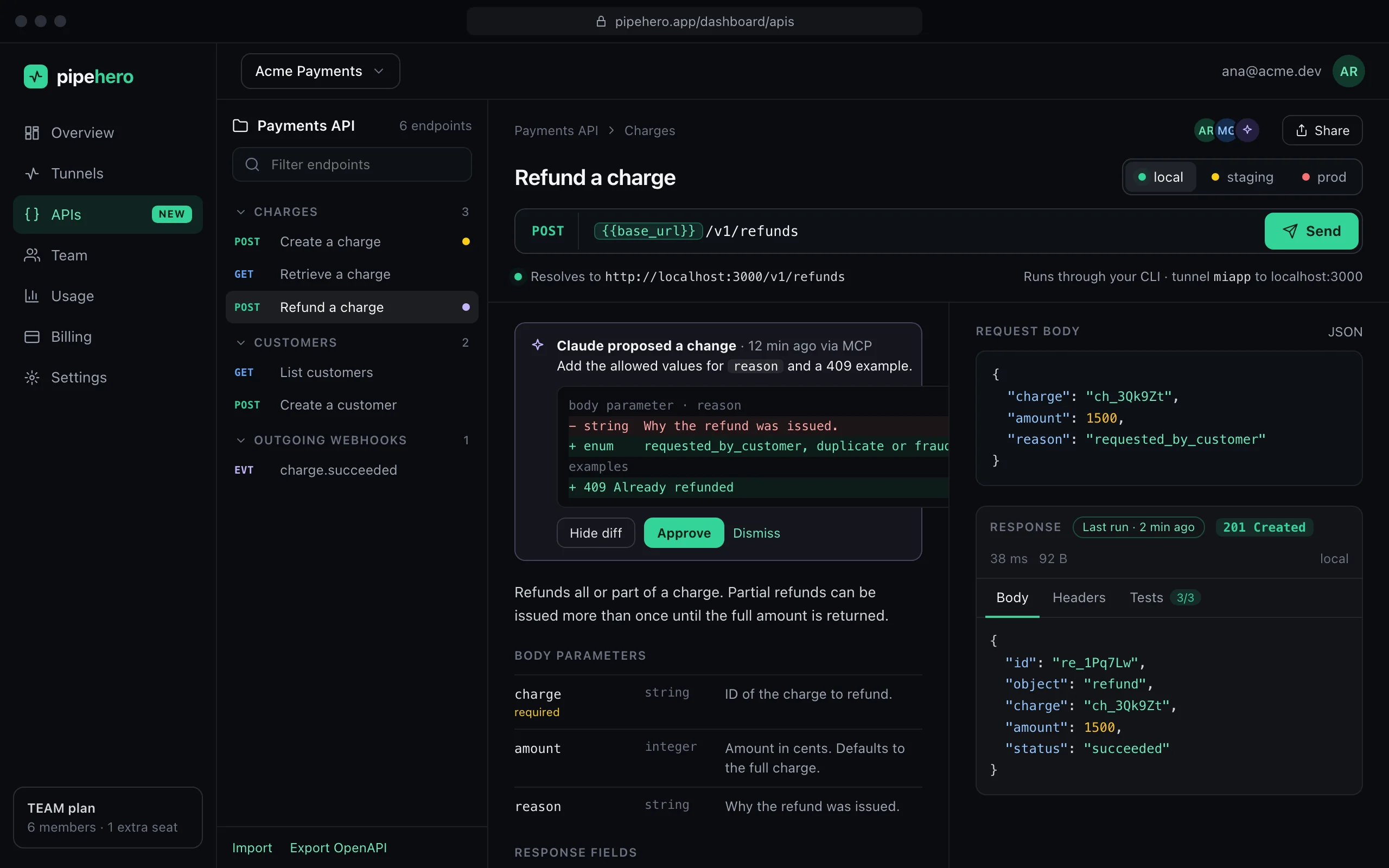
What your agent can do
- ›Read your collections, endpoints and environments.
- ›Create or update an endpoint by its method and path, as written in the code (/users/:id and /users/{id} are the same route). Repeating it never duplicates, and a stale version is rejected so it never overwrites a teammate's edit.
- ›Save response examples, delete endpoints for routes that are gone, and import or export a spec.
- ›Run an endpoint against your local environment and compare the real response with the docs.
- ›Save real captured requests as docs, check for drift and see which monitors are failing.
Connect it once
Claude Code connects with one command, and Cursor, Claude Desktop, VS Code and any MCP client work with just the URL. Your browser opens once for you to approve; there is no token to paste.
You stay in control
- ›Every change is recorded in the endpoint's history as made by an AI agent, with the start of the token it used. Restore an earlier version at any time.
- ›On the Team plan, agent changes can wait for a teammate: you see the exact change as a diff and approve or reject it, with a reason the agent can read.
- ›An agent never sees a secret's value and can't create secrets.
- ›It can't write to production unless you confirm that specific request.
Prompts that work
- ›“I just added a refund route. Document it, including the 409 for an already-refunded charge.”
- ›“Compare the Payments API docs with the routes in this repo and fix whatever drifted.”
- ›“Run Create a charge against my local environment and tell me if it matches the docs.”
FAQ
Which agents work?
Any MCP client: Claude Code, Claude Desktop, Cursor, Windsurf, VS Code with Copilot, Zed and others.
Can the agent break my docs?
It can change them, and every change is attributed and can be restored. On Team you can require approval before anything is applied.
Does it work with the local CLI too?
Yes. pipehero mcp lists and runs the same tools, along with the tunnel ones that act on your machine.
Keep reading
Everything is in the API workspace docs, and the other parts are Import OpenAPI and Postman, Local, staging and production, Scheduled API monitoring.
Document and test your API in minutes
Free plan, no credit card. Import a spec or start from your webhooks, and keep it true from there.
Get started free