Your API docs, tested against real traffic
Save endpoints with the requests and responses you actually see, run them on localhost, staging and production, and keep them true as your code changes. A Postman-style client and documentation tool, connected to your webhooks and to your AI agent.
Included on every plan. Free: 1 collection, 25 endpoints.
Everything you need to document and test an API
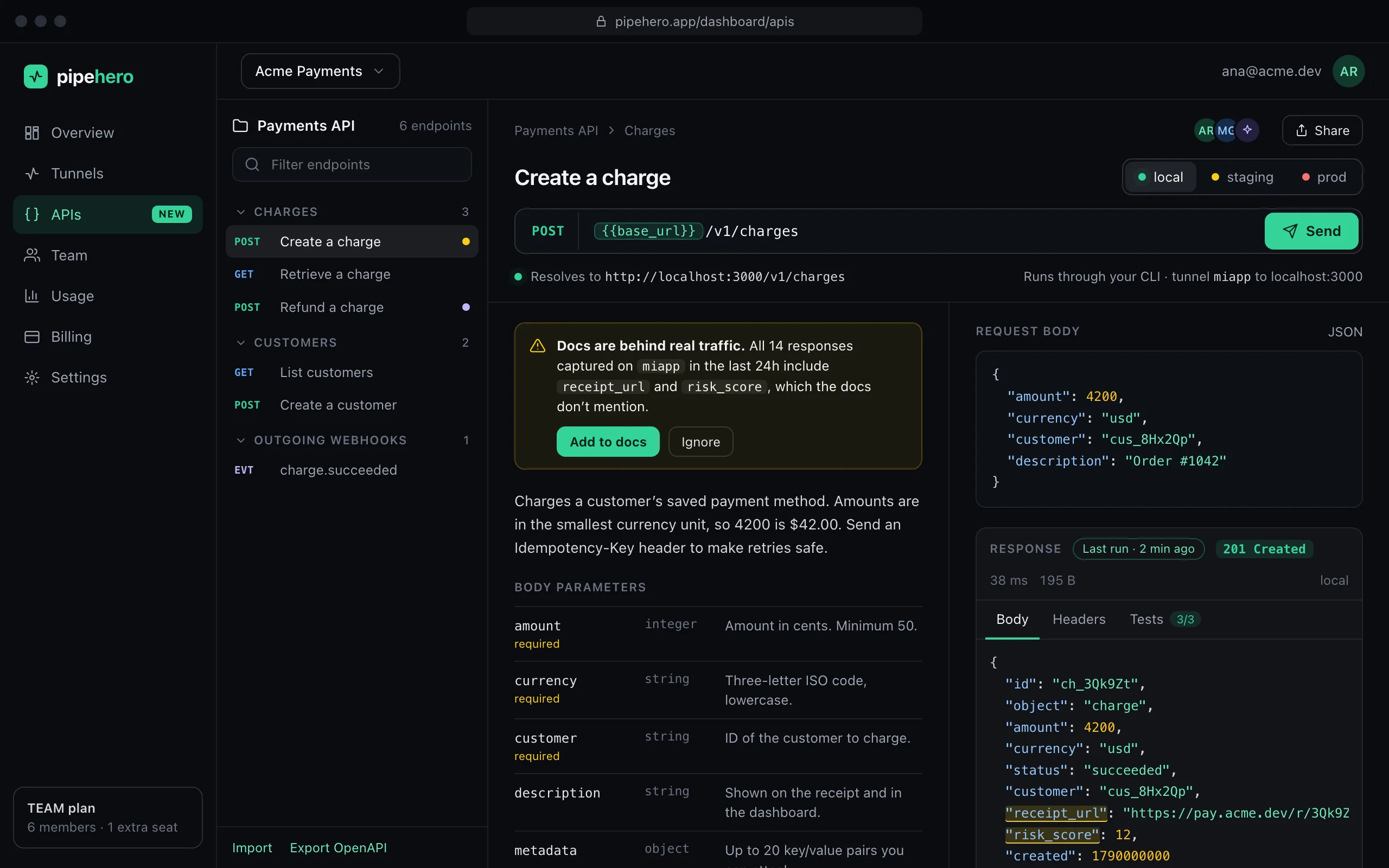
Endpoints with real examples
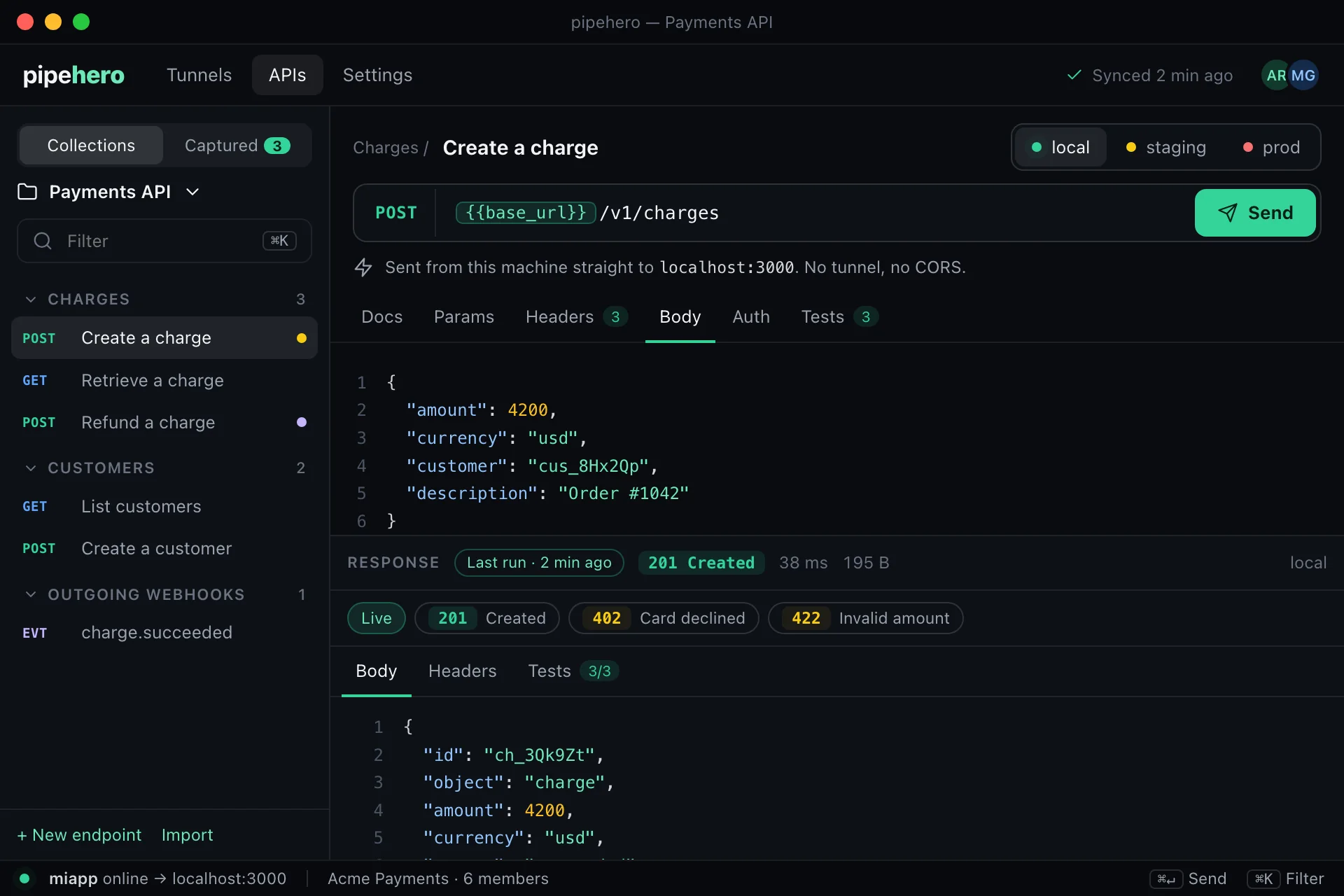
Method, path, parameters, headers, a request body and the responses you actually got, organized in folders and shared with your whole workspace.
Local, staging and production
Send the same request to each environment. Local goes through your tunnel to localhost, staging and prod are sent from the cloud, and writes to prod ask for confirmation.
Learn more →Variables and secrets
Use {{variables}} and built-ins like {{$uuid}} in paths, headers and bodies. Secret values are encrypted, never shown again and scrubbed from history.
Learn more →Pre-request and test scripts
pm.environment.set before the request goes out — compute a signature, fill a variable — and pm.test after the response comes back. The same test a monitor uses to decide pass or fail.
Import and export
Bring an OpenAPI 3.x file (JSON or YAML), a Postman collection, a cURL command or a browser capture (HAR). Take it with you as OpenAPI 3.1 or Postman.
Learn more →Documented from real traffic
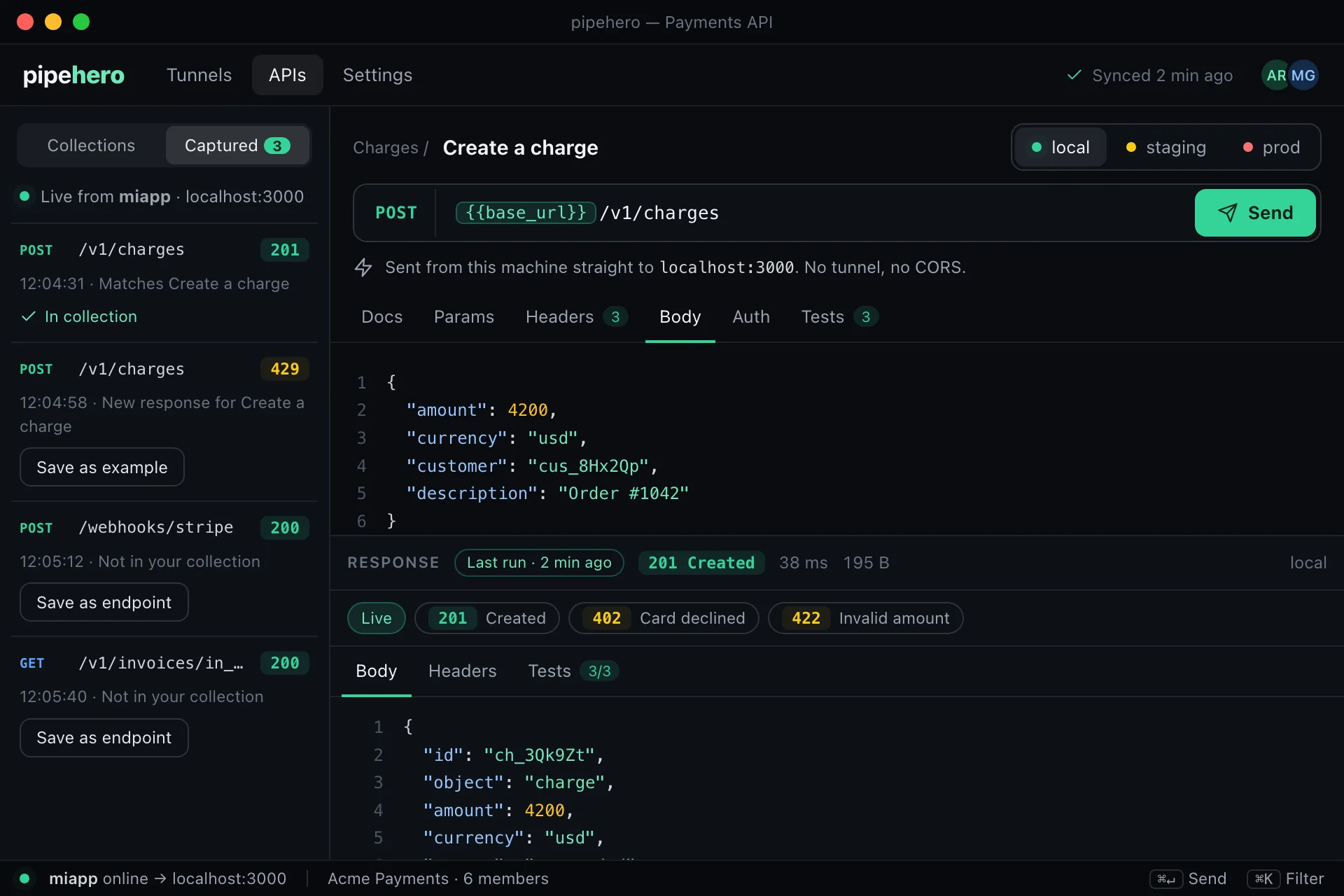
Open a request in the live tail and save it as an endpoint or an example in one click. Credentials, cookies and signatures are replaced by variables.
Learn more →Drift detection
Compare your docs with what a tunnel really captured and see routes, status codes and fields nobody documented, each with the request that shows it. Pro and Team.
Learn more →Scheduled monitors
Run an endpoint against staging or production every few minutes and get an email when it starts failing, and when it recovers. Pro and Team.
Learn more →History and restore
Every change is kept with who made it and what it touched, including changes by an AI agent. Restore any earlier version, on every plan.
Learn more →Built for teams
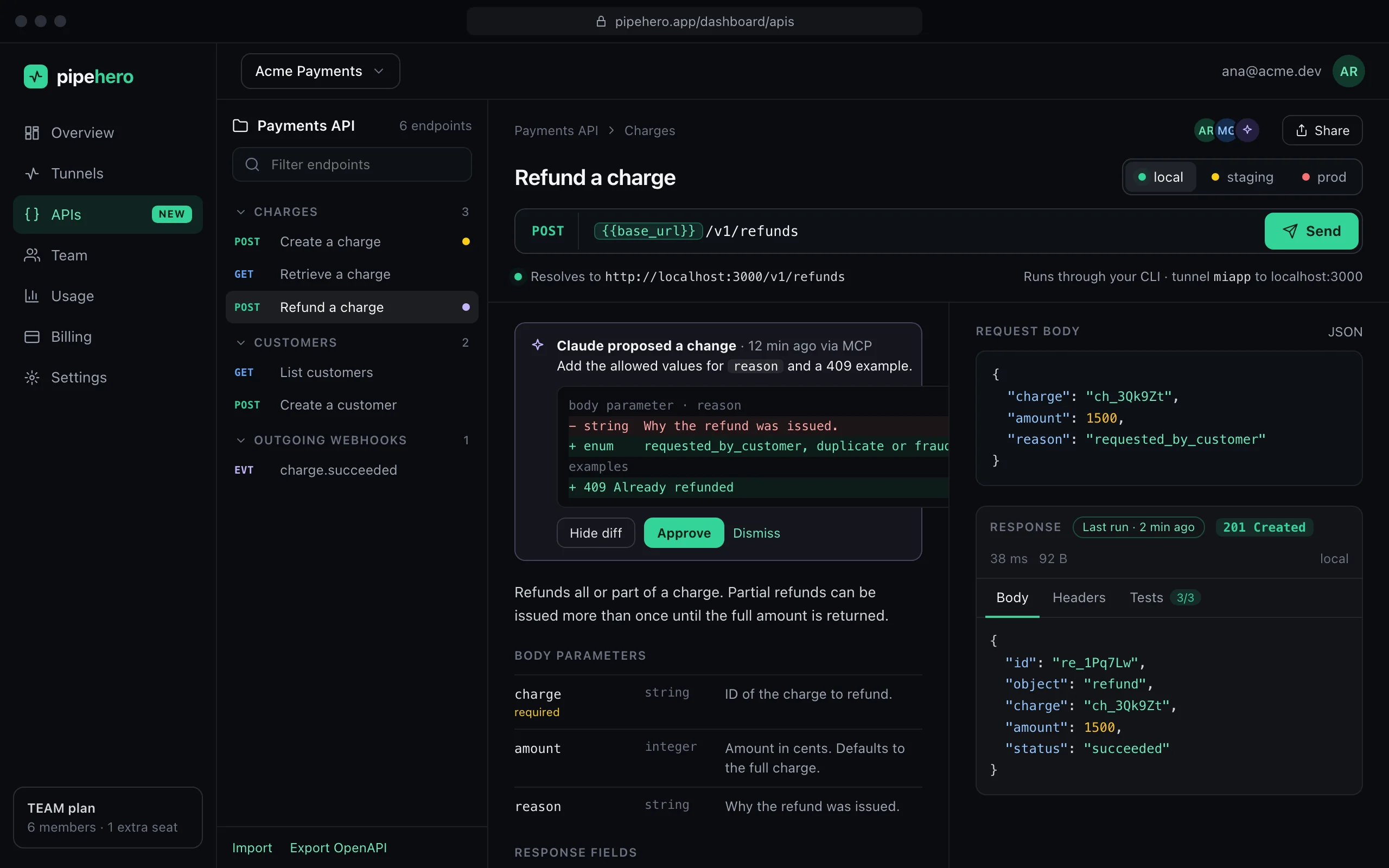
Comments on endpoints and an approval step for changes proposed by AI, so nothing lands in your docs without a teammate saying yes. Team plan.
Learn more →An AI agent that keeps the docs true
Connect Claude Code, Cursor or any MCP client. When you add or change a route, your agent updates the endpoint, saves the new response as an example and runs it against your local environment to check. Every change shows who made it, and can be restored.
On the Team plan you can ask for approval first: the agent proposes, a teammate reviews the exact change and approves or rejects it, and the agent can read why.
claude mcp add --transport http pipehero https://mcp.pipehero.app/mcp
From your machine, or from the cloud
The desktop app has an APIs tab with the same collections. It sends the request straight from your computer, with no tunnel and no server in between, so it reaches localhost and private networks. Secrets are asked for and kept only while the app is open. More about the desktop client →
Prefer the browser? Local environments go through your tunnel; staging and production are sent from the cloud, with writes to production asking for a second click.
How it works
- Step 1
Import or start empty
Drop in an OpenAPI or Postman file, paste a cURL command, or create a collection and add endpoints as you go.
- Step 2
Send and save
Pick an environment, press Send, read the real response and save it as an example.
- Step 3
Let traffic fill the gaps
Point a webhook or your app at a Pipehero tunnel. Save captured requests as docs and get told when reality drifts from them.
- Step 4
Keep it current with your agent
Connect your AI agent over MCP. It updates the docs as you change routes, and you approve what it proposes.
What sets it apart
Most API clients start from an empty request. This one starts from the traffic you already have.
Plans
| Free | Pro | Team | |
|---|---|---|---|
| API collections | 1 | 10 | Unlimited |
| Endpoints | 25 | 500 | Unlimited |
| Environments per collection | 3 | 10 | Unlimited |
| Run against staging and prod | No | Yes | Yes |
| Drift detection | No | Yes | Yes |
| Scheduled monitors | No | 5 | 50 |
| Review AI changes, comments | No | No | Yes |
Running from localhost and from the desktop app is available on every plan. See pricing.
Guides
FAQ
What is the Pipehero API workspace?
A place to document and test your API. You keep endpoints with their parameters and real request and response examples in shared collections, run them against local, staging and production environments, import what you already have, and keep the docs current from real traffic and from your AI agent.
Is it a Postman alternative?
For documenting an API, trying it against different environments and sharing that with your team, yes. It is different in that it is connected to real traffic: it can turn captured webhooks into docs, tell you when docs drift, monitor endpoints and let an AI agent maintain the collection. It has pre-request and test scripts (pm.environment, pm.test, pm.response) on every plan, but no collection runner yet to run every endpoint in one sequence, so it is not a full replacement for every Postman workflow.
Can I import my Postman collection or OpenAPI file?
Yes. Drop in an OpenAPI 3.x file (JSON or YAML), a Postman collection (v2.x), a cURL command or a browser capture (HAR). Credentials are never imported: they become variables you fill in per environment. You can export a collection as OpenAPI 3.1 or Postman 2.1.
How do I test an API running on localhost?
Use a local environment: the request goes out through your Pipehero tunnel to the port your CLI forwards to. Or use the desktop app, which sends the request straight from your computer with no tunnel and no server in between.
How does it stay up to date?
Three ways. Save a real request from the live tail as an endpoint or an example. Run drift detection to see fields and status codes your docs don't mention. Or connect an AI agent over MCP: it can update endpoints as you change routes, and on the Team plan a teammate approves each change first.
Can an AI agent change my docs without asking?
Only if you let it. Every change an agent makes is recorded in the endpoint's history as made by an AI agent, and you can restore an earlier version. On the Team plan you can require approval, so agent changes wait for a teammate.
Is my data safe when I run requests from the cloud?
Cloud runs only reach public internet addresses, don't follow redirects, and are capped in time, size and rate. Environment secrets are encrypted at rest, never shown again after you save them, and removed from run history and from the live tail.
What does it cost?
The API workspace is included on every plan. Free gives you 1 collection and 25 endpoints. Pro adds 10 collections, 500 endpoints, runs against staging and production, drift detection and 5 monitors. Team is unlimited, with 50 monitors, comments and review of AI changes.
Document and test your API in minutes
Free plan, no credit card. Import a spec or start from your webhooks, and keep it true from there.
Get started freeAlso see the API workspace docs and how to connect your AI agent.