API documentation your whole team can trust
Shared docs only help if people can tell who changed what and undo a mistake. Every collection is shared with your workspace, and every change leaves a trail.
History is on every plan. Comments and review of AI changes are on Team.
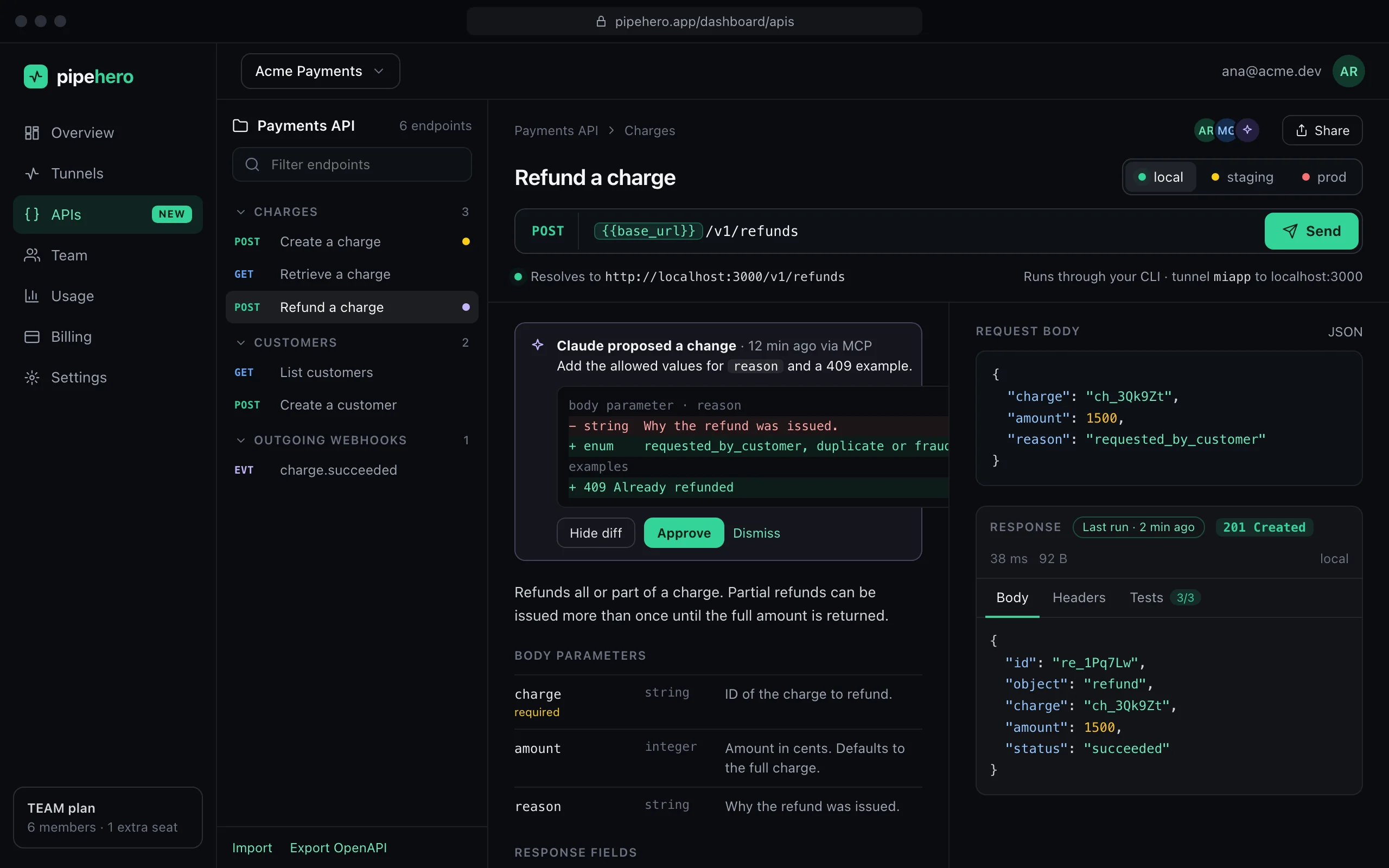
History and restore
Every real change to an endpoint is kept with who made it, which fields it touched and the version it produced. Open History to see the before and after, and restore any earlier version. Restoring is a new version, so you can undo it too. The latest 50 changes per endpoint are kept, on every plan.
Changes by AI agents are labeled as such, with the start of the token they used, so you can tell them from a teammate's.
Comments
On the Team plan, teammates can leave comments on an endpoint. Anyone can mark one resolved or reopen it, which makes a comment a shared to-do, and only its author can delete it. A comment keeps its author's email even if they leave.
Review of AI changes
Turn on “Require approval for AI changes” and what an agent tries to write waits as a proposal. You see a line saying what it would do and the exact call, then approve or reject. Approving applies the agent's own call once, and the history still names the agent as the author. Reading, exporting, checking drift and running requests are never held.
Who gets what
- ›Every plan: shared collections, history and restore.
- ›Team: comments and review of AI changes.
Shared by default
Collections belong to the workspace, not to a person. Every member can read and edit them, and the workspace's plan sets the limits. If a workspace is suspended for billing, its docs stay readable but can't be changed until billing is fixed.
A typical review, start to finish
- ›You change a route and your agent proposes the matching update to the docs.
- ›The proposal appears under “AI changes” with a one-line summary and the call it would make. Deletions are flagged.
- ›A teammate opens the details, approves it, and it is applied once. The history shows the agent as the author and the proposal shows who approved.
- ›If it can't be applied any more, for example because the endpoint was deleted meanwhile, it is marked as failed with the reason.
FAQ
How far back does history go?
The latest 50 changes of each endpoint. Endpoints that existed before history started begin with a baseline, so even their first change can be undone.
Are examples part of the history?
No. History covers the endpoint's definition: its name, method, path, description, parameters, headers, body, tests and folder.
What if the workspace leaves the Team plan?
Existing comments stay readable. Writing new ones and requiring review need Team, and pending proposals can still be decided.
Keep reading
Everything is in the API workspace docs, and the other parts are Local, staging and production, Document your API from real traffic, API drift detection.
Document and test your API in minutes
Free plan, no credit card. Import a spec or start from your webhooks, and keep it true from there.
Get started free